How to Read Your Gas and Electricity Meters
10 December 2025 • 6 min read
New to the world of utilities? Meter readings can seem pretty confusing at first, but at UniHomes we’re here to help you decipher both your gas and electricity meters so that you can spend less time stressing over your bills and more time focusing on studying and socials.
@unihomes Tips on meter reading as a student 👏 #unihomesambassador #unilife #meterreading #studenthouse #studenttips @_emily.su
♬ original sound - UniHomes - UniHomes
Why do I need to submit meter readings? 🤷
Smart meters automatically send your usage data to your energy provider so that you don’t have to, but if you’re not fortunate enough to have a smart meter in your student house then you’ll have to manually take and send your energy meter readings yourself.
This will generally be something you have to do on a monthly basis, and is important for a number of reasons:
- Your meters show accurate readings on how much gas and electricity you’ve been using, and submitting these numbers to UniHomes ensures your account is fully up to date and running smoothly; after all, at UniHomes we want to make sure we’re paying utility providers the right amount on your behalf, so that your bills experience remains stress free.
- Regularly sending in your meter readings to UniHomes or your utility provider prevents any mixups, especially when you’re in a student flat or shared building – at UniHomes we want to be certain that we’re paying for the right property homes on your behalf!
- Any potential issues can be identified a lot more easily when you regularly record your meter readings, as your provider will be able to spot discrepancies in real time that wouldn’t be identifiable if just going off estimated readings.
Where are my meters? 📍
Energy meters can be in some interesting places, so make sure you know where yours are before you need to take that first reading. Meter locations vary from house to house, but here are some places where we’ve seen utility meters:
- On an outside wall in meter boxes (you’ll likely need keys to access these, but your landlord should have provided you with these when you moved in; if not, contact your letting agent)
- Under the stairs
- In a kitchen cupboard
- In a cabinet in the living room
- In a cellar/basement room
- In your hallway
Top tip: ask the letting agent or landlord where the meters are during the property viewing itself, so that way you have all the information you need before you even move in.
What do my meters look like? 🔍
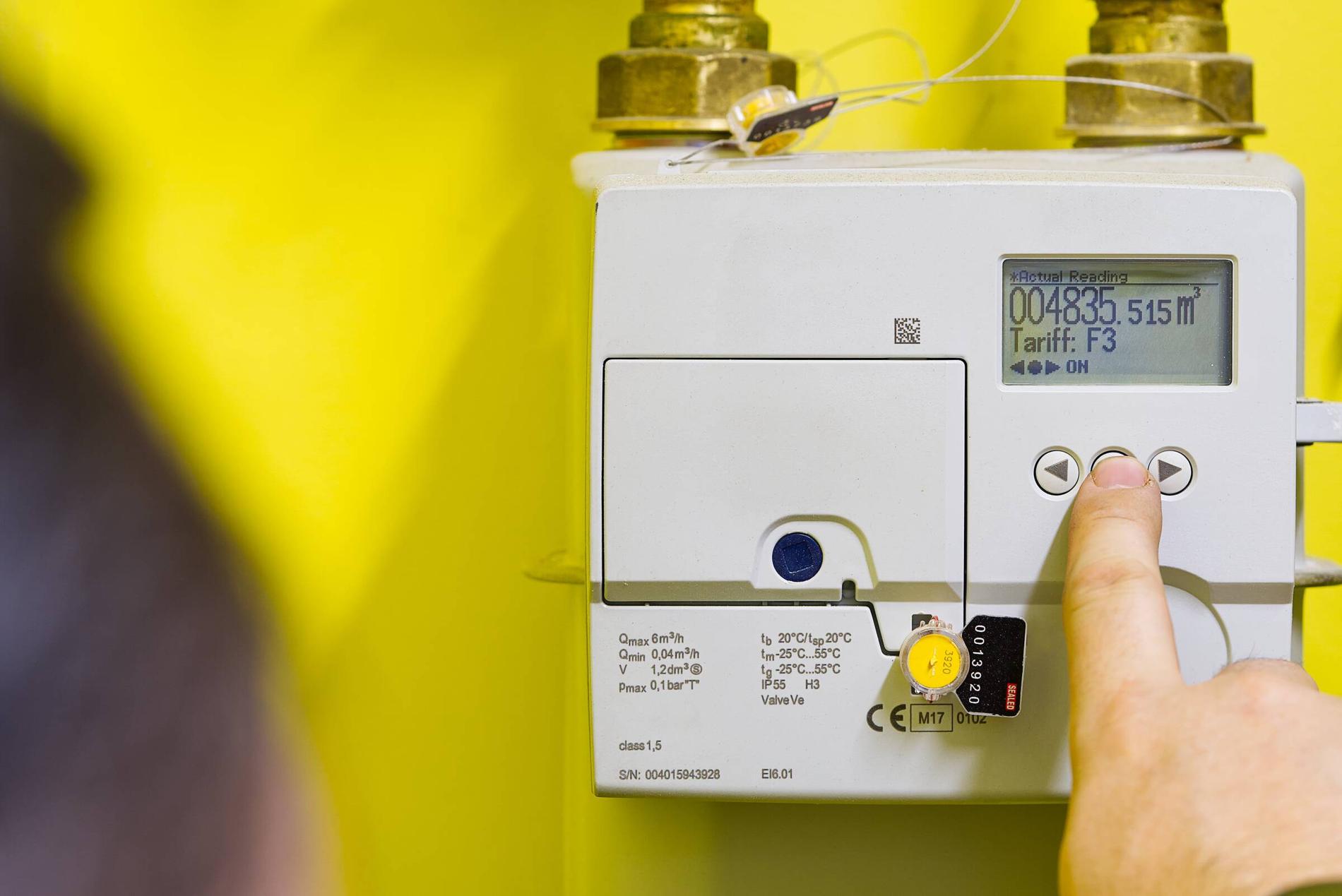
This is something else that can vary from property to property, but your gas and electricity meters are small boxes on the wall that either have a digital or analogue (i.e. dials or counters) display. The gas meter will show measurements in m3, ft3, or ‘volume’, whereas the electricity meter will be in IMP kWh.
If your electricity meter has a digital display and isn’t showing any numbers, just press the on button a few times (or the number ‘9’ if it has a number pad) and the screen will wake up.
How do I know if I have a smart meter? 🤔
Smart meters look a lot like traditional meters (and are located in similar places), except they also come with a portable display screen that can sit anywhere in your house to give you real-time energy usage stats. This little monitor is a telltale sign that you have a smart meter and therefore don’t need to manually send meter readings to your utility provider (as the smart meter will do it for you).
How do I read my electricity meter? ⚡
Reading your electricity meter is easier than it first seems. All you need to do is look at the display and note down the numbers from left to right, making sure you ignore any red numbers or any numbers that are after a decimal point or comma.
Sometimes your electricity meter will have dual rates so will show two different sets of numbers, but if this is the case then all you need to do is take note of both readings (once again ignoring any digits that are red or after a decimal point). For digital displays, write down the number shown on the ‘total’ screen.
How do I read my gas meter? ❓
Like with your electricity meter, make sure you read your gas meter display from left to right, ignoring any numbers that are in red or after a decimal point or comma.
How do I read a dial display? ⏱️
Dial displays can be a little trickier to understand, but you’ll soon get the hang of reading them. For the first five dials (from left to right), write down the numbers that the pointer has just passed, ignoring any red dials.
If the pointer is exactly on a number, underline this number and move on to the next dial. If the next dial is between a 9 and a 0, reduce the number you underlined by one – but if this gets a bit too confusing, give UniHomes a call and we can talk you through everything.
How do I submit my meter readings? 📱
Submitting your meter readings is normally done by inputting the readings on your energy supplier’s app, but if UniHomes manages your utilities then all you need to do is type your readings into the unique link that UniHomes will have texted or emailed you. Easy!
How often should I submit my meter readings? ⌛
You should submit your meter readings as per your provider’s guidance, which is normally once a month; don’t worry though, you should get a text or email reminder from UniHomes or your supplier when the time comes to submit.
Make sure you submit utility readings when you move in and again when you move out, too, so that you don’t accidentally end up paying for the previous or next tenants’ energy usage. On top of this, make sure to send in your readings before you go home for Christmas as well!
@unihomes Tips on how to do your meter reading before you go home for Xmas 🎄 #unihomesambassador #meterreading #studenttips #StudentLife #unilife @evielovattx
♬ original sound - UniHomes - UniHomes
Navigating meter readings as a student can sometimes raise even more questions about how utilities work, but luckily our Leeds Content Ambassador Emily is here to help with her blog post on what she wishes she’d known about student bills before starting university.
Not sorted your utilities yet?
At UniHomes, we're here to help take the stress out of student bills with our student utilities packages. Bundle your gas, electricity, water and Wifi into one monthly payment that's split fairly between you and your housemates, so you can spend less time setting up your bills and more time studying (or socialising). Get a quote for a UniHomes bills package here.